I decided to choose PDF over other formats (like .chm, .hlp, .doc..) as PDF is print-ready, easily searchable, can be indexed by google and most of us have the free Acrobat Reader.
This is the procedure I followed to generate the PDF file:
- Blogger does not have an export or download function. So I followed the instructions here to create a single file with all my posts.
- I opened a free trial account with Adobe to use their service “Create Adobe PDF Online” - It is a great online tool to convert your documents or Webpages to PDF. The free version allows you to convert upto 3 documents. It even does OCR for you.
- I passed by blog address to CreatePDF and the PDF file was in my inbox the next minute. Wow !! Thank you Adobe.
You can view my blog archive in PDF here. Just download it and browse the entire blog offline.
Direct link for the Archive file here.
Incase the Yahoo Briefcase service is down, you can use this link.
http://ezshare.de/files-en/130659/Amit_Agarwal_Blog.pdf.html





 Macromedia Captivate (formerly RoboDemo) automatically records all onscreen actions and instantly creates an interactive Flash simulation. Point and click to add text captions, narration, and e-learning interactions without any programming knowledge.




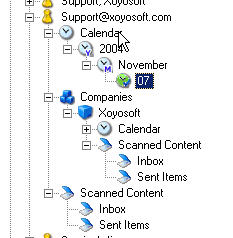 Viapoint comes with an in-built news reader - just drag a feed URL over the News Sites node and Viapoint will do the rest for you. I think they let you drag OPML files as well. If you read a news story about your contact, you can drag that news item into the Contact Company folder so it is filed with other relevant information. This way you never loose information or news stories about people.

